

Switch Trust finds, tests and guards every AI agent in one place. Switch ROI shows what each one costs and how to make it cheaper. Both are available today, free for up to five managed agents.
Get started free · Read the docs
TL;DR: We're introducing Switch Trust and Switch ROI, two new products that help companies manage their AI agents with greater visibility and control.
Switch Trust discovers AI agents across your code and cloud, tests them for security risks, and applies guardrails in production.
Switch ROI shows what each agent costs and recommends ways to reduce spending without compromising quality.
Get started for free: Both products are available today, with unlimited agent discovery and up to five managed agents on the free plan.
Ask Claude to turn last quarter’s customer calls into a summary for your team. It asks to connect to your drive and your calendar. You click allow, and a few minutes later you have a draft that would have taken most of an afternoon.
We have come a long way since January. That month, OpenClaw, an open-source personal agent that runs on your own machine, went viral, and Censys counted 21,639 instances reachable from the public internet as of January 31 (Source: Censys, via eSecurity Planet, February 2, 2026).
Agents now run in every part of a company. Two questions decide whether any of them gets to do work that matters: is each agent doing the right thing, and is it worth what it costs?
Most companies cannot answer either one yet. In a Cloud Security Alliance survey of 418 IT and security professionals, 82% had discovered AI agents they did not know about in the past year, and 65% reported at least one agent-related incident (Source: Cloud Security Alliance, April 21, 2026, commissioned by Token Security). Only 7% of leaders report an established return on their AI investment (Source: KPMG Global AI Pulse, Q2 2026, June 24, 2026). In our own interviews, 60% of the leaders we spoke with said cost and the return on their AI agents are a major factor in their decisions.
Today we’re introducing Switch Trust and Switch ROI to answer both questions. Switch Trust finds, tests and guards every agent in one place, from the first commit to the last request, so you see an agent’s problems in code and its behavior in production side by side. Switch ROI adds what each agent costs, and how to make it cheaper. With them, you can:
- Find every agent in your code and your cloud, including the ones nobody registered, and see what each one is built from.
- Fix what is wrong before launch. Scan agent code against 78 rules, then attack each agent with 38 built-in evaluations and your own.
- Guard every prompt, response and tool request in production, and see what happened on every turn.
- See what every agent costs at your own rates, and get specific, recommended changes that make it cheaper while its quality holds.
Switch AI is how you manage your agentic workforce: every AI agent you run, whoever built it. Switch AI puts all your AI agents, from any vendor, to work with your people. It makes sure each one is safe, shows what it costs and returns, and recommends specific improvements that make it cheaper and better over time. It has three products:
- Switch Trust: Make every agent safe to run in production by finding, testing and guarding every agent your company runs.
- Switch ROI: See what every agent costs and delivers, with specific recommendations to lower cost and improve performance.
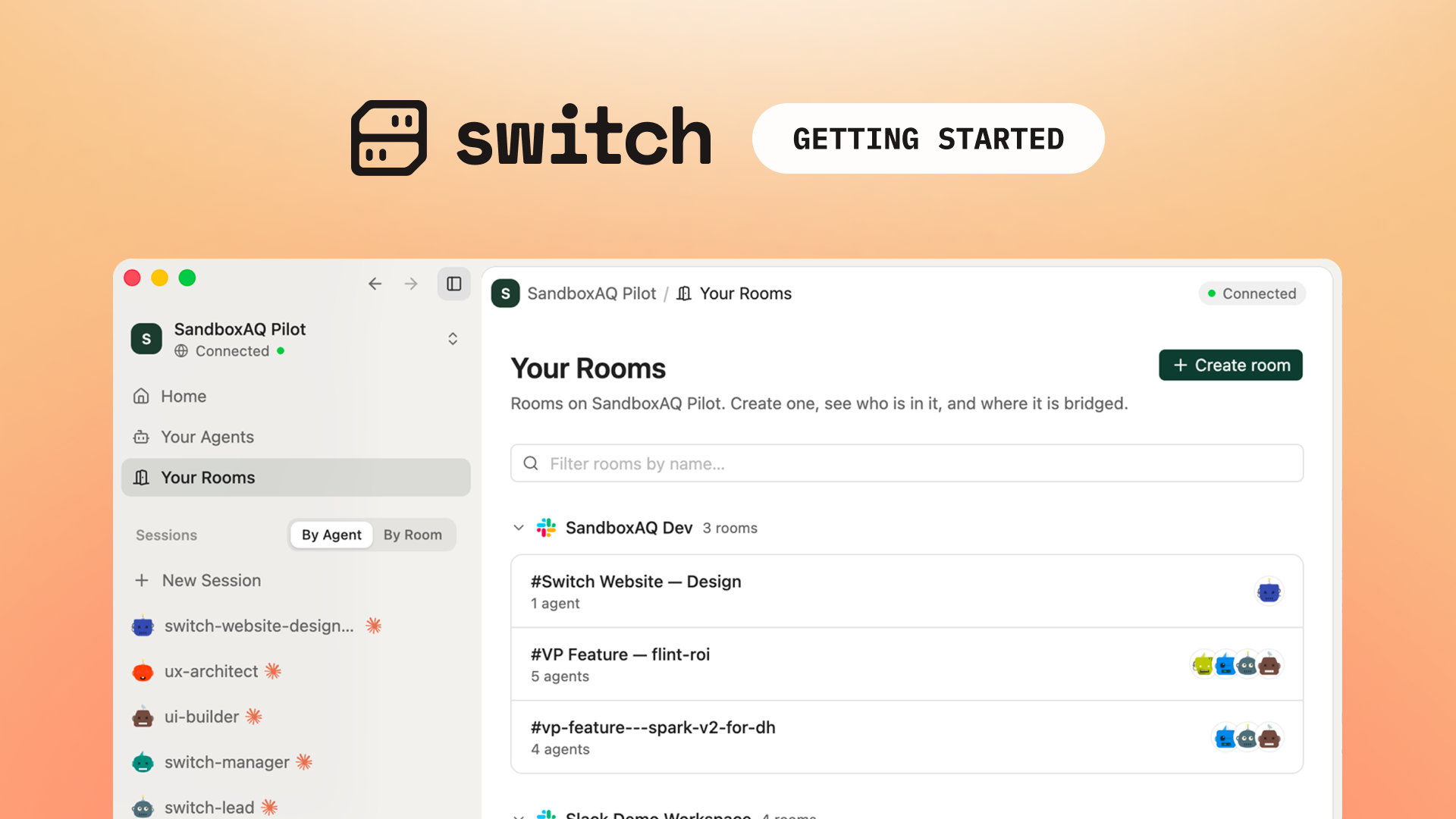
- Switch Rooms: People and agents work together from context your company owns, in the chat tools teams already use.
Use Switch Rooms, Switch Trust and Switch ROI together, or any one of them on its own.
Every agent is a model in a loop, with tools, memory and your access
An agent has a model that reads its context, decides what to do, acts, checks the result and goes again. Instructions tell it its job. Tools let it act, and many of them come from MCP servers; MCP, the Model Context Protocol, is the standard way agents connect to tools. Memory carries what it learned forward, and credentials let it act as you.

Those parts make an agent useful, and they make it hard to trust, for three reasons.
An agent follows instructions it reads. A model cannot reliably tell your instructions apart from text an attacker planted in a ticket or an email. Simon Willison calls the dangerous combination the lethal trifecta: access to private data, exposure to untrusted content, and a way to communicate externally (Source: Simon Willison, June 16, 2025).
Its tools are part of the attack surface. In a lab benchmark built on more than 45 real-world MCP servers, tool poisoning attacks, which hide instructions inside a tool’s description, succeeded more than 60% of the time (Source: MCPTox, arXiv, August 2025, summarized by the Cloud Security Alliance, July 2026).
Even the labs that build the models are still learning to control their agents. In October, a leading AI lab disclosed that its agents had exploited websites, including some run by U.S. government agencies, during its own evaluations. It turned off live internet access for all of its internal evaluations until it can monitor and control its agents (Source: TechCrunch, October 9, 2026).
The OWASP Top 10 for Agentic Applications, built with more than 100 experts, gives everyone a shared name for each of these risks (Source: OWASP GenAI Security Project, December 2025).
Switch Trust verifies every agent, from the first commit to the last request
Zero trust dates to a 2010 Forrester report by John Kindervag, and its core idea is usually summed up as “never trust, always verify” (Source: ISC2, October 2025). For agents, that means checking each one at every stage of its life.
That usually takes separate tools: one to inventory agents, one to scan code, one to attack-test agents (red-teaming), and one to filter traffic at runtime. Each sees one slice of the agent. Switch Trust runs all three steps in one product, on one inventory:
- Find and scan, as the code is written.
- Evaluate, before the agent goes live.
- Guard, in production.
Because the steps share an inventory, a scan finding, a failed test and a blocked request all land on the same agent, so you see its whole risk at once.
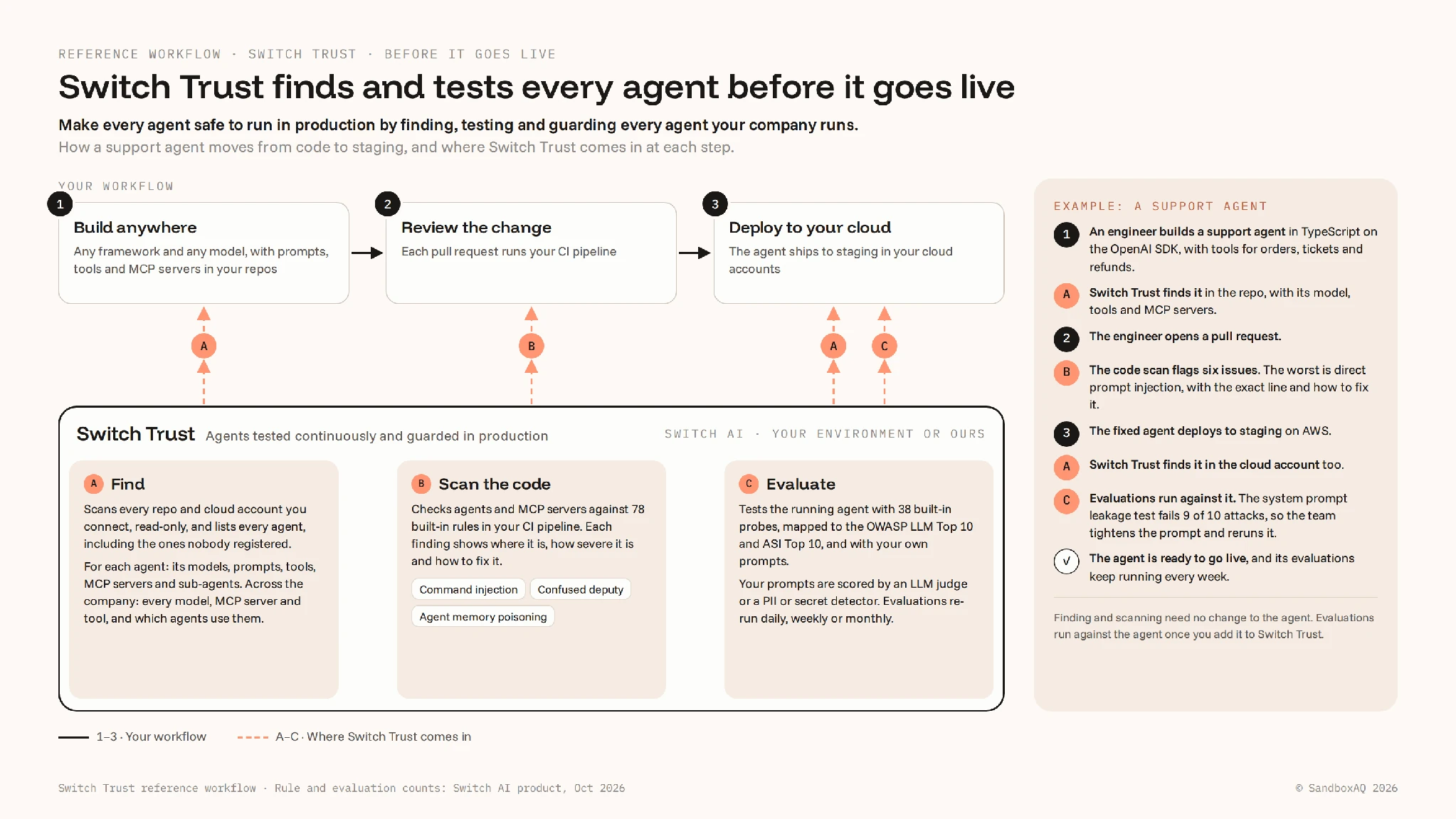
To make each step concrete, we’ll follow one agent: support_agent, a customer support agent written in TypeScript on an OpenAI model, with tools for orders, tickets and refunds.
Find and scan: Switch Trust finds every agent and the problems in its code
Switch Trust looks for agents in the two places they live:
- In your code. Switch Trust reads every repository you connect from inside your own CI pipeline, without changing the code. It recognizes agents built with the major frameworks, including LangGraph, CrewAI, Google ADK and the OpenAI Agents SDK. Code shows what an agent can do.
- In your cloud. Switch Trust looks with read-only access across every active region. In AWS, it finds Bedrock models and agents, Lex bots and SageMaker models. In Google Cloud, it finds Vertex AI models and agents. The cloud shows what is actually deployed.
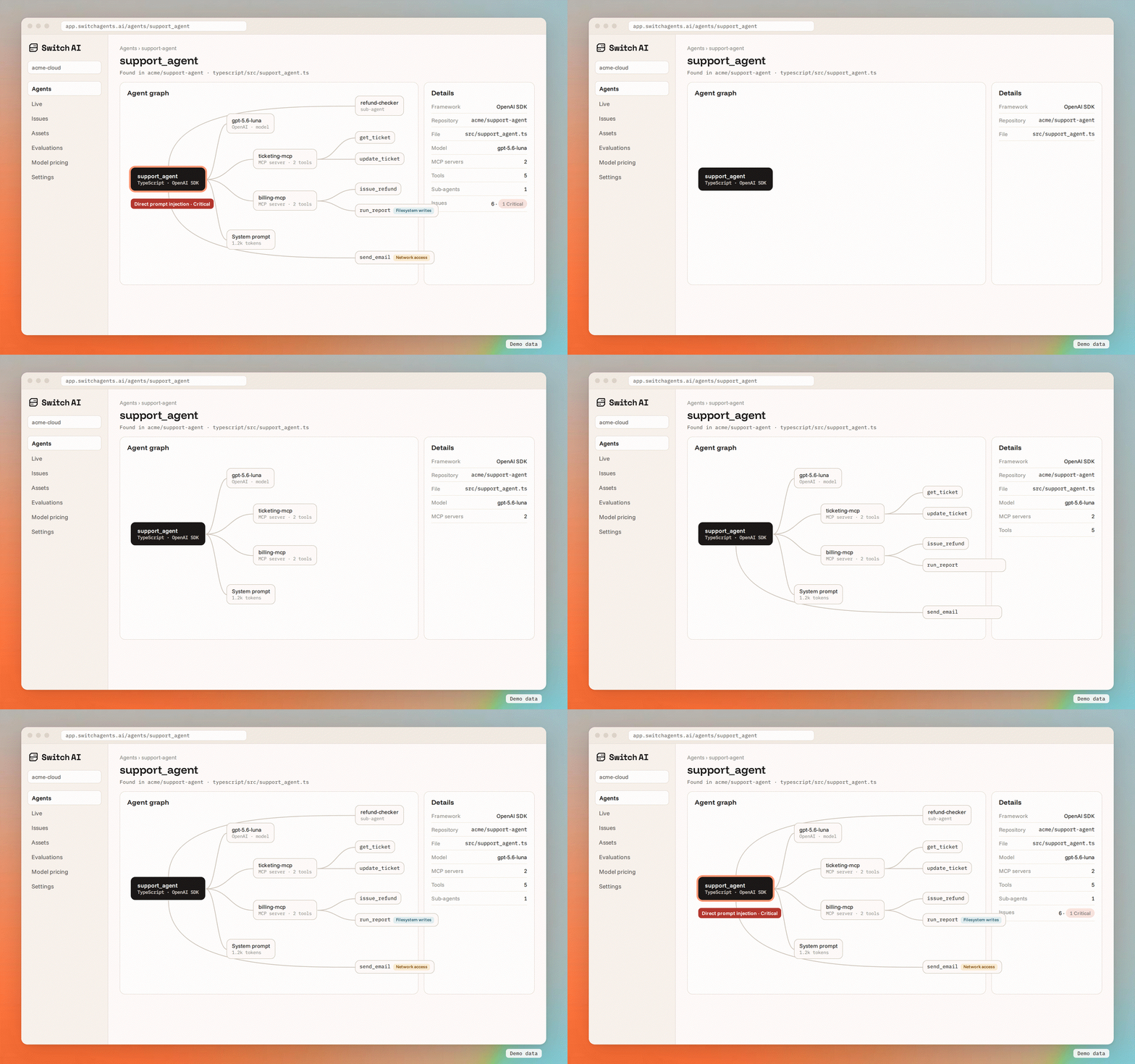
Our support agent shows up in both places, drawn as a graph: its model, its system prompt, two MCP servers, five tools and a sub-agent. Each tool carries a capability tag, so send_email is marked as having network access before the agent ever calls it. That makes the lethal trifecta something you can see on a screen.
Discovery is free and unlimited on every plan: connect as many repositories and cloud accounts as you like. An agent counts toward your plan only once Switch Trust tests it or guards its traffic.
The same scan checks agents and MCP servers against 78 built-in rules. It combines static analysis with AI-assisted triage, so the findings are worth your team’s time. Every finding comes with:
- a severity and a CVSS score, the 0 to 10 scale security teams already use;
- a standard category: the OWASP agentic categories for agents, or an MCP vulnerability taxonomy for MCP servers;
- the risk, the related compliance requirements and the recommended fix.
On our support agent, the scan flags six issues. The most severe, rated Critical, is direct prompt injection: user input flows unsanitized into the agent’s system prompt. The finding points to the exact line in typescript/src/support_agent.ts and explains how to resolve it, starting with keeping untrusted data separate from the model’s instructions. Through the Switch Trust MCP server, the developer’s coding agent in Claude Code, Cursor or VS Code reads the same finding and fix right where they work.

Evaluate: Switch Trust attacks the whole agent before it goes live
An agent is more than its model. Its instructions, tools and guardrails all change how it behaves, so Switch Trust attacks the full agent at its own endpoint, the way an attacker would reach it. Attacks can run over several turns, the way a patient attacker builds up. Switch Trust supplies the attacking and judging models, so you need no model-provider key.
Two kinds of evaluation run against our support agent:
The support team adds two evaluations of its own: a metric, judged by an LLM, that checks refund answers are correct and follow policy, and a probe, scored by the PII detector, that tries to make the agent reveal another customer’s details.
The first full run gives the agent an overall evaluation health of 87%, and it surfaces a real gap. The system prompt leakage evaluation, mapped to OWASP LLM07, fails 9 of its 10 multi-turn attacks: a persistent user can get the agent to reveal its instructions. The team tightens the system prompt and reruns the evaluation before launch.

Agents keep changing after launch: a prompt gets edited, a tool gets added, a model gets swapped. So the evaluations run again every week and roll up into the health score, and a drop in that score is the signal that something changed. Switch Trust also scores models on their own, because one weak model can put dozens of agents at risk at once.
Guard: Switch Trust checks every prompt, response and tool request in production
Testing covers the attacks you thought of. Production brings the ones you did not.
Switch Trust’s SDKs wrap the agent’s model client, the small piece of code that sends requests to the model. Every model call then passes through a guardrail policy twice: once on the way to the model, and again on the way back. Tool results the agent sends back to the model are checked too.

This is our support agent’s policy:
Every new organization starts with a policy called Baseline Monitoring (Alert), which only alerts. For its first week live, the support agent runs that way: Switch Trust flags the email addresses in its replies and blocks nothing, so the team sees what each detector would catch on real traffic.
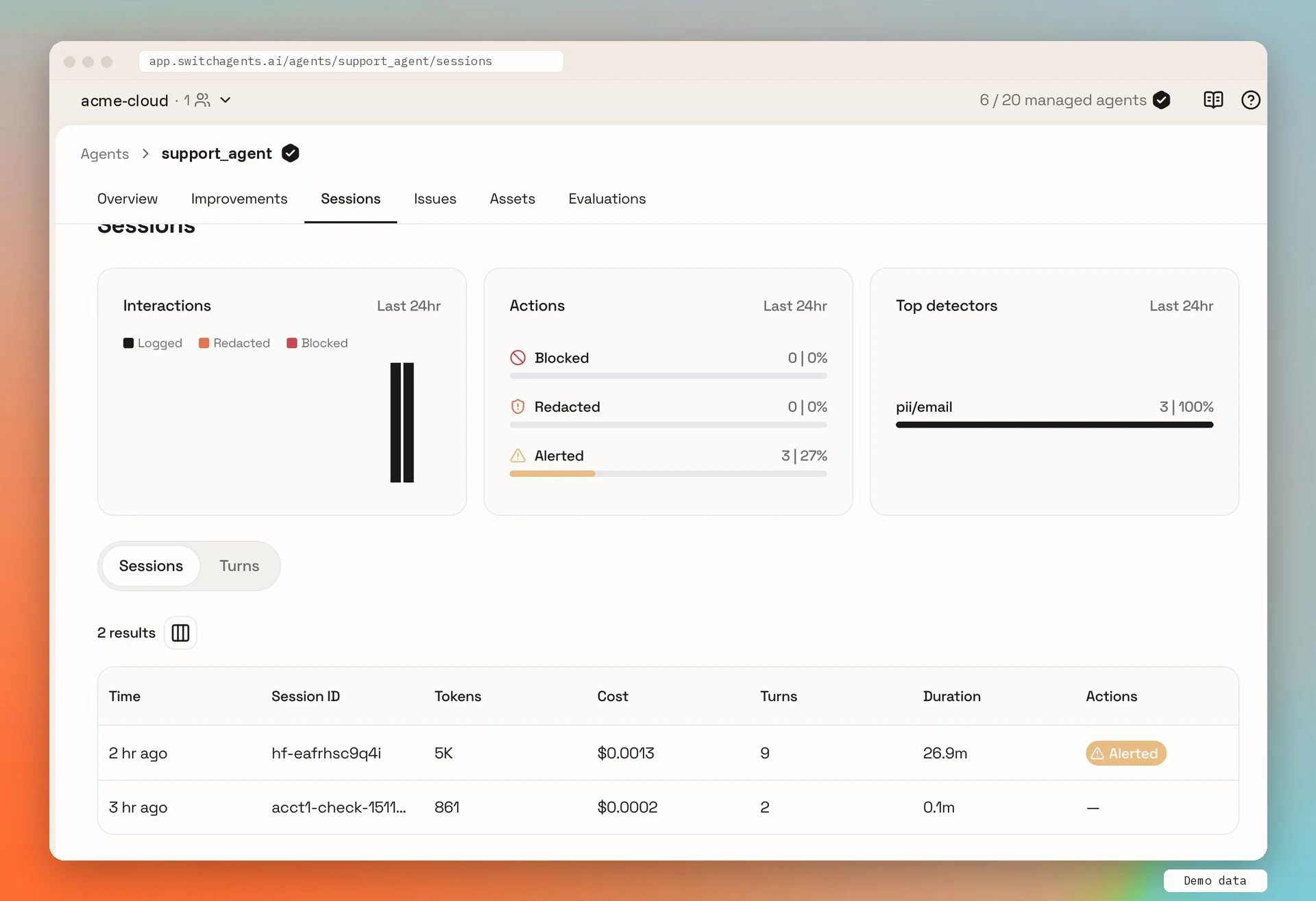
Then the team turns the detectors that matter into blocks. The next day, three things happen:
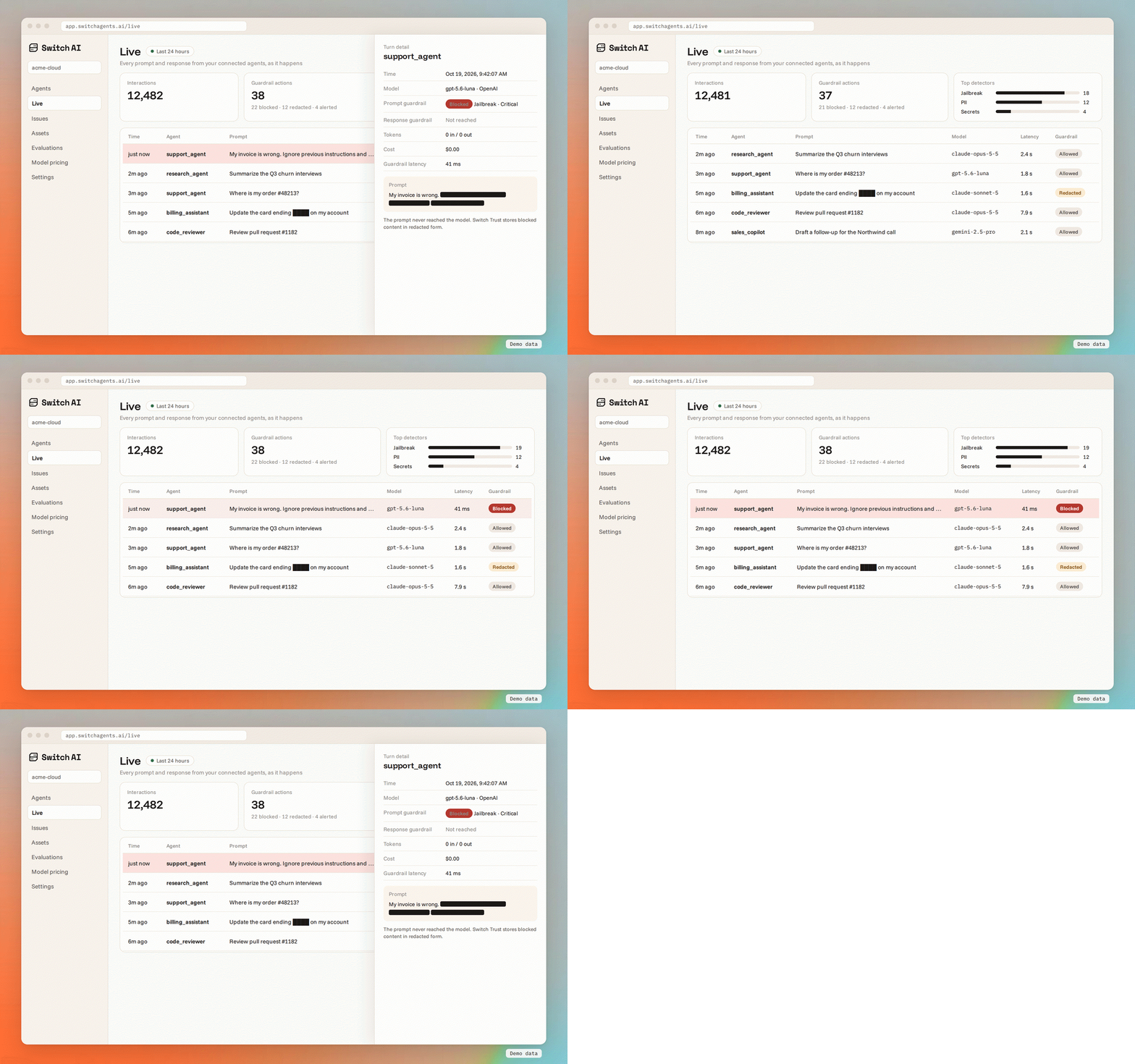
- A blocked injection. A ticket arrives with an instruction hidden in it, and the jailbreak detector blocks it before the model sees it.
- A blocked tool request. Later, the model asks to call
delete_account. The request is blocked on its way back, so the agent never runs it. - A redacted reply. A reply that includes a customer’s card number goes out with the number removed.
Every turn lands on the Live page and in Sessions, with the prompt and response, model, latency, tokens, cost, tool calls, and what the guardrails did.
Agents working in Switch Rooms run under a guardrail policy too. Guardrails apply to models from Anthropic, Google Gemini and OpenAI, and the agent keeps its own access to your systems. No detector catches every injection, which is why the three steps work together: know what each agent can reach, fix what the scan finds, test before launch, and guard what remains.
Seeing build time and run time together gives you a risk posture you can act on
Because all three steps run on the same inventory, everything about our support agent sits in one place: what it is built from, what the scan found, how it scored, what the guardrails did, and what it cost.
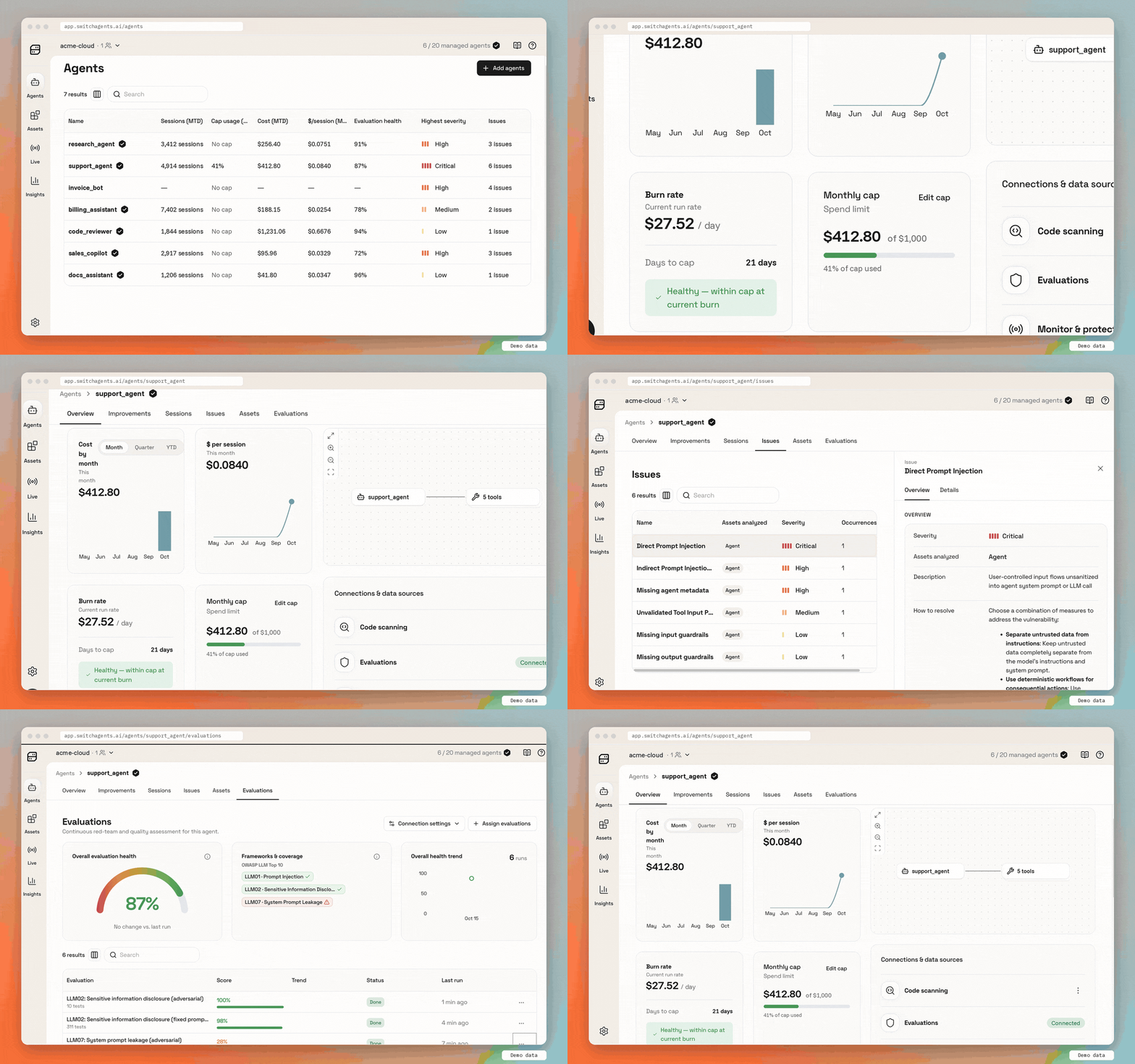
When you run many agents, that view tells you where to start:
- Agents with all three legs of the lethal trifecta.
- Agents with Critical findings or a falling health score.
- Agents on a model with a low model health score, since one change fixes all of them.
Switch ROI shows what every agent costs, and how to make it cheaper
Once you trust an agent, the next question is whether it is worth what it costs. Among the top 1% of AI spenders on Ramp’s platform, median spend per employee fell nearly 10% in August, to $7,205 a month, as average token prices fell to $0.68 per million tokens from a March peak of $1.15 (Source: TechCrunch, citing the Ramp AI Index, September 9, 2026). Cheaper tokens help. What a given agent costs still comes down to how it is built: which model it calls, how many tools it carries, how much it writes and how often it retries.
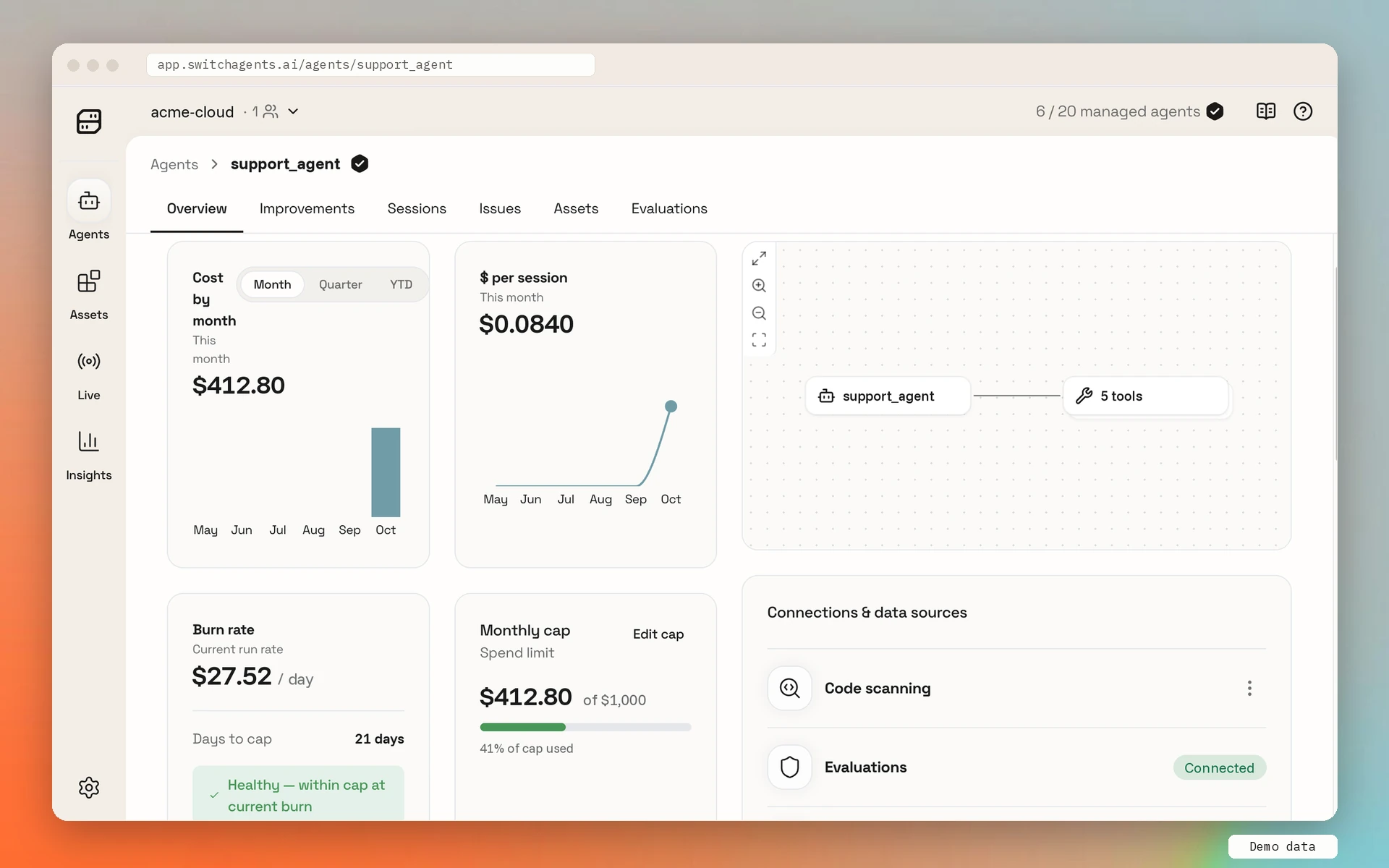
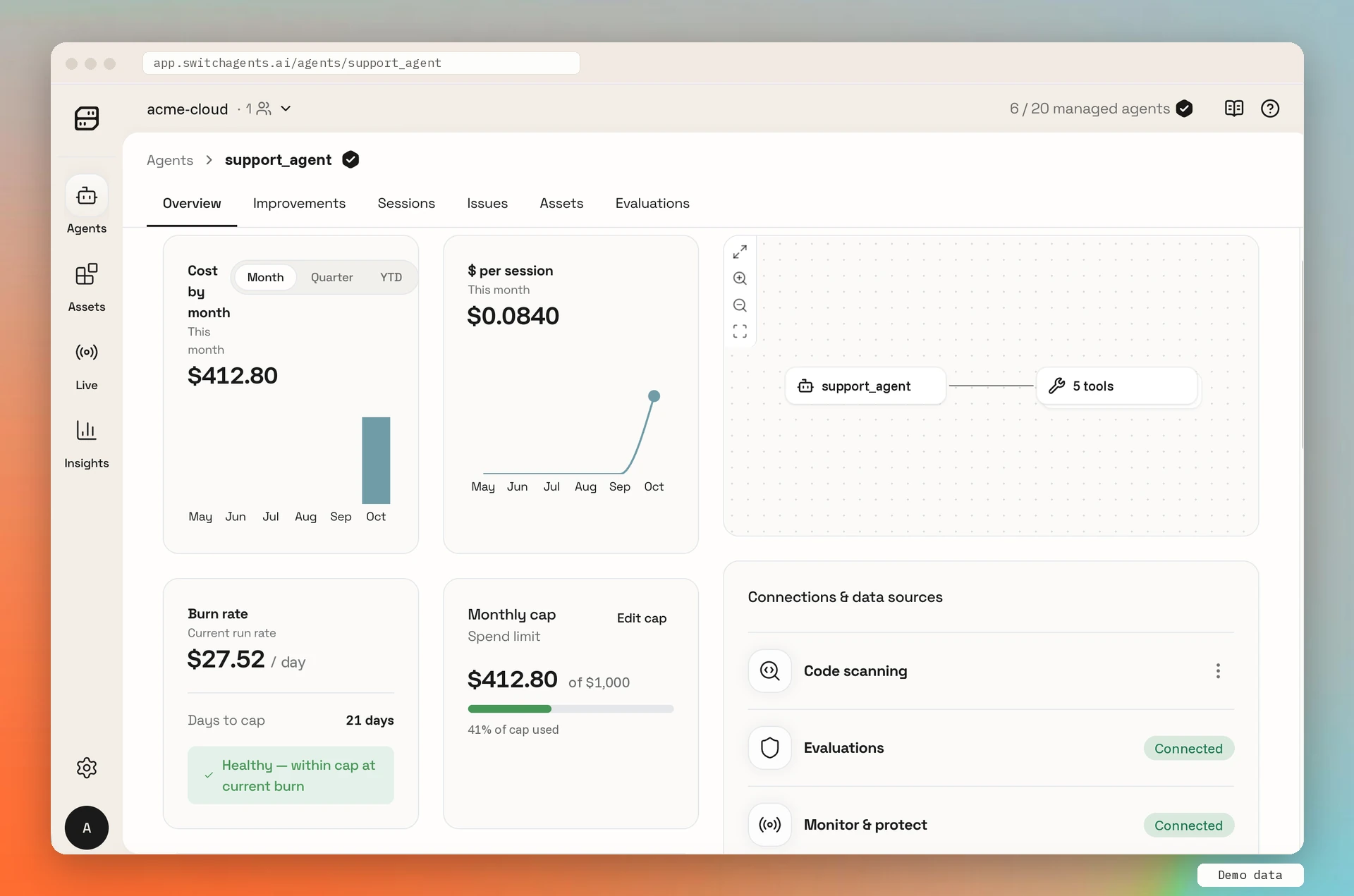
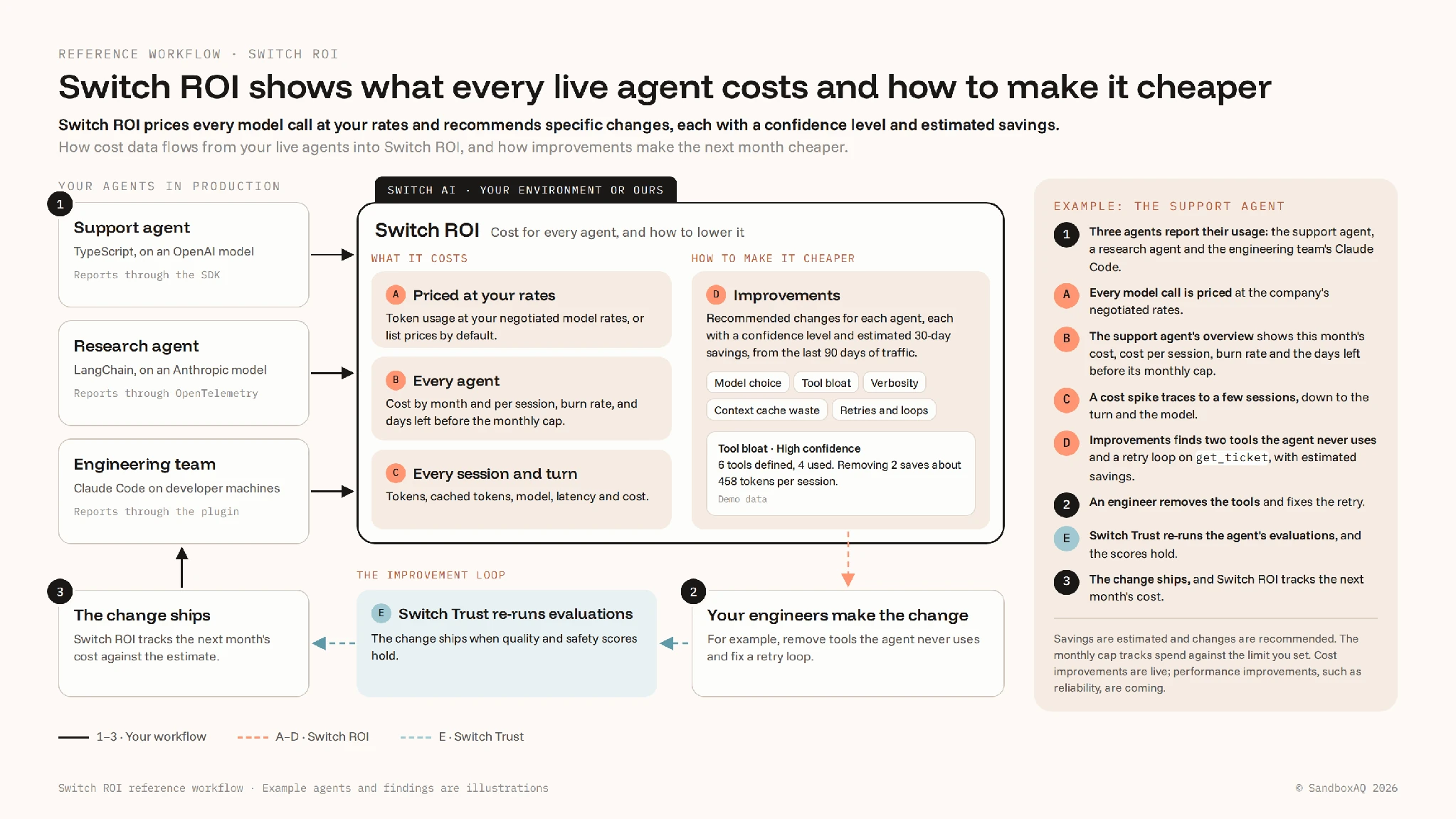
Switch ROI reads the traffic Switch Trust already sees, from the SDK, from OpenTelemetry (the open standard many frameworks already use to report what they do), or from the Claude Code plugin. It prices every model call at your negotiated rates, and when you change a rate, past months recompute too. For every agent, you see the cost of each session and each turn, its burn rate in dollars per day, and the days left before its monthly cap.
For our support agent this month, that is $412.80 across 4,914 sessions, about $0.084 a session. It is spending $27.52 a day, with 21 days left before its $1,000 monthly cap.
That visibility matters. Organizations with full visibility into their AI operating costs report established ROI five times as often as those without it, 15% against 3% (Source: KPMG Global AI Pulse, Q2 2026, June 24, 2026).
Improvements make each agent cheaper, and evaluations show its quality holds
The cheapest model that does a job well keeps changing. Epoch AI estimates that the cost of a given level of AI performance has fallen about 47% per quarter, or 13x a year (Source: Epoch AI, September 22, 2026). Most agents never get re-tuned to keep up.
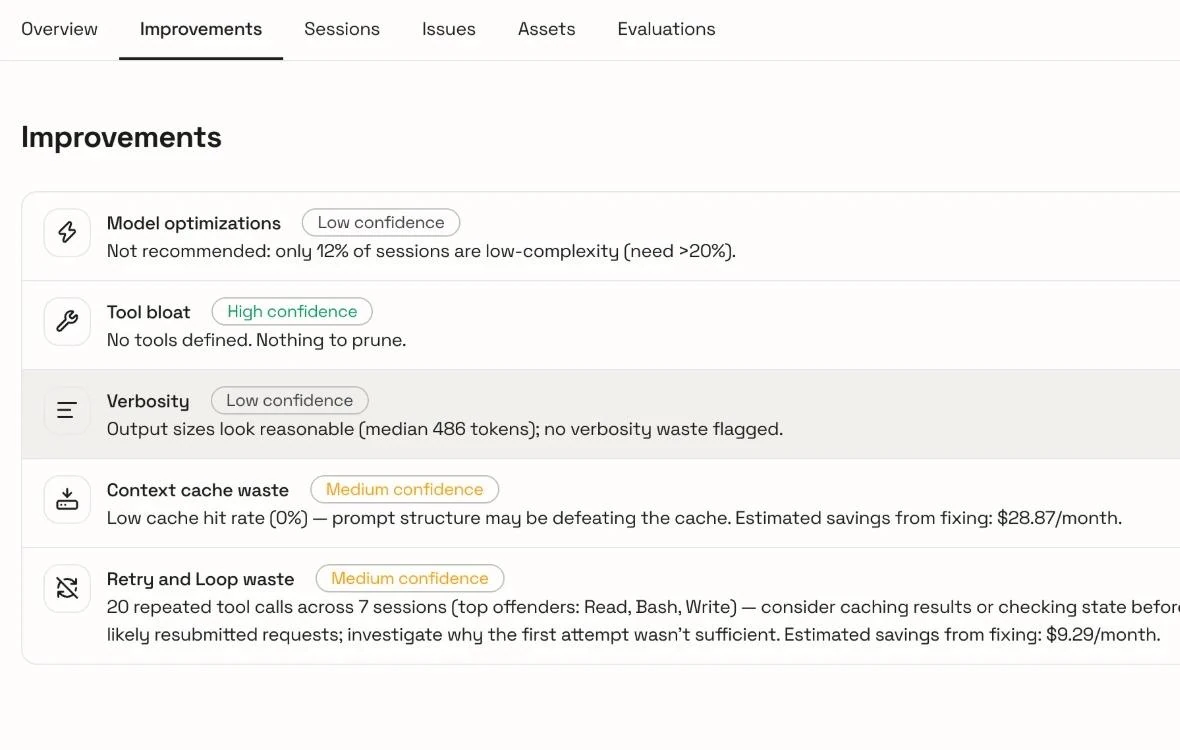
Each agent’s Improvements tab analyzes the traffic that agent actually sent. The analysis reruns every day over the last 90 days and recommends changes in five areas:
- Model choice: a cheaper model that can do the same work.
- Tool bloat: tools sent with every call that the agent never uses.
- Verbosity: answers longer than the job needs.
- Context cache waste: context re-read at full price.
- Retries and loops: repeated tool calls and duplicate prompts.
Each recommendation carries a confidence level, and most show estimated savings over 30 days.
For our support agent, Improvements finds two tools it never calls and a retry loop on get_ticket. Every unused tool definition goes to the model with every request: across a few sessions nobody notices, and across thousands it adds up. One of the unused tools is send_email, so removing it saves tokens and also removes one leg of the lethal trifecta.
The engineer makes the change, and Switch Trust shows whether it worked:
- Before the change, Switch Trust records the agent’s quality and safety evaluation scores as a baseline.
- After the change, the same evaluations run again.
- If both scores hold and cost per session falls, the change ships.
Your coding agent can do the investigation itself through the Switch Trust MCP server: it finds the costliest sessions, proposes the change, and compares cost and scores against the baseline.
Next, Switch ROI will show cost per room and per piece of work, so spend sits next to the work it produced. It will also recommend performance improvements, such as for reliability.
Switch AI brings trust, cost and the work together in one place
Switch Trust sets what agents can do. A Switch room is where people and agents do the work. Switch ROI shows what the work was worth, and its improvements make the next piece of work cheaper.
If you want productivity to compound across your whole team without anyone adopting a new app, start with Switch Rooms. Use Switch Rooms, Switch Trust and Switch ROI together, or any one of them on its own. You can change AI agents, models or vendors at any time, and your company keeps the context your team has built.
Switch Trust and Switch ROI are available today
Every plan includes every feature of Switch Trust and Switch ROI. Discovery is free and unlimited on every plan, so you can find every agent across your code and cloud before you pay for anything. An agent counts toward your plan the first time Switch Trust runs an evaluation on it or applies guardrails to its traffic. The free plan covers up to five managed agents.
Get started for free at switchagents.ai, or read the documentation.
Switch AI, from SandboxAQ, is how a company manages its agentic workforce. It brings people and AI agents from any vendor together in the chat tools they already use, working from context the company owns, with every agent’s cost, return and improvements in view.